Technical Summary
Managing self-hosted PostgreSQL instances requires provisioning cloud compute, setting up WAL replication, and configuring automated backups. Neon.tech modernizes SQL databases by separating compute from storage architecture. The platform provides a 100% Free Serverless PostgreSQL Tier offering 10 GB of storage, 0.25 vCPU auto-scaling compute, instant Copy-On-Write (COW) Database Branching, and native pooled connections without requiring a credit card. 💬 FAQs & Solutions ↓
Neon Free Tier Specifications
- 10 GB Free Storage: Sufficient for storing millions of relational rows, JSONB documents, and indexes.
- No Credit Card Verification: Register instantly using your GitHub or Google account.
- Instant Database Branching: Create an isolated clone of your database schema and data in under 1 second.
- Built-in Connection Pooling: Native PgBouncer integration for serverless Edge functions (Vercel / Cloudflare Workers).
- Full PostgreSQL 16 & pgvector: Native support for vector embeddings and standard SQL extensions.
Serverless PostgreSQL Architecture Overview
Neon decouples storage from compute. Pageserver nodes manage distributed storage on S3, allowing compute nodes to scale down to zero when idle and instantly spin up when an HTTP request arrives:
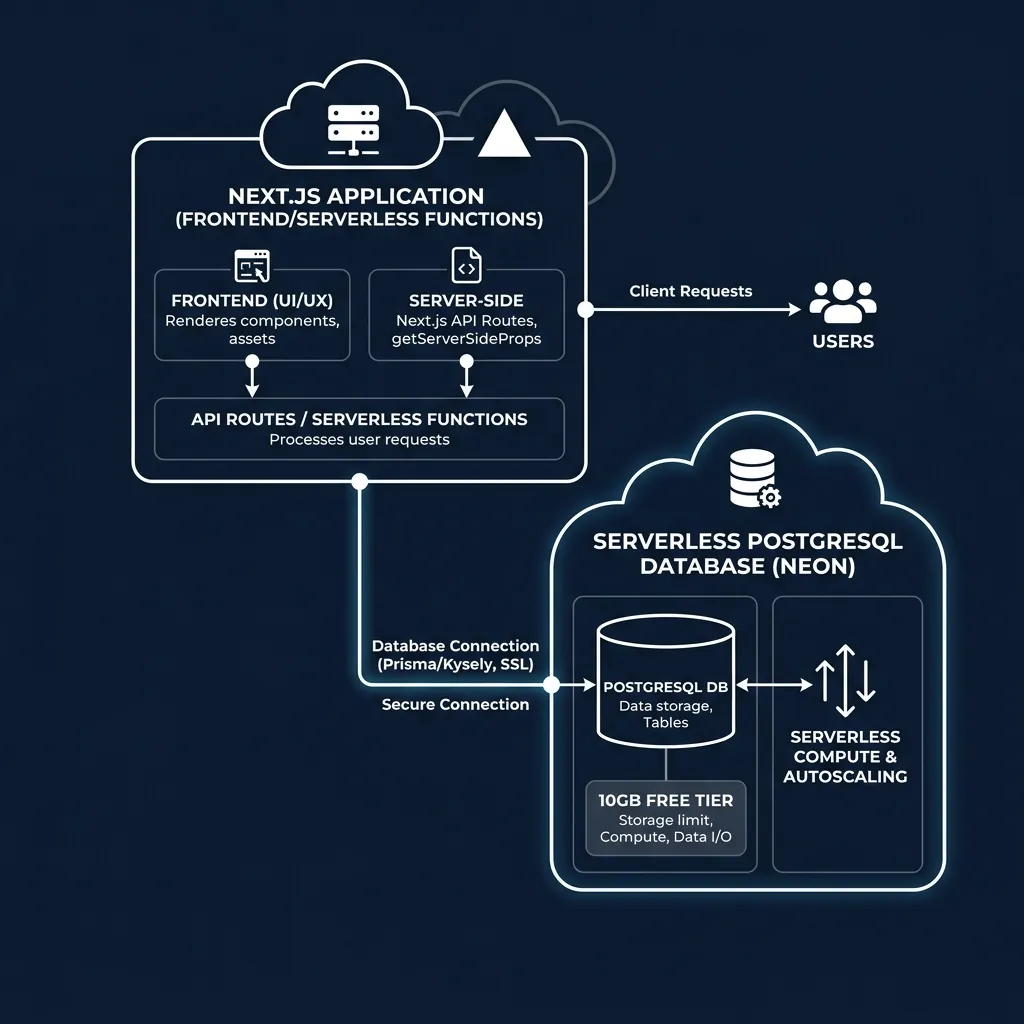
Decoupled serverless architecture: Compute scales dynamically while 10GB storage persists safely.
Step 1: Creating a Free 10GB Project on Neon.tech
Setting up a new database cluster takes under 60 seconds with no credit card requirement:

Neon.tech project dashboard displaying 10GB free tier cluster configuration.
- Go to Neon.tech Official Sign-up and log in with GitHub.
- Click Create Project. Enter a project name (e.g.
my-nextjs-app). - Select your preferred region (e.g. AWS
us-east-1oreu-central-1). - Select PostgreSQL Version 16 and click Create Project.
Step 2: Working with Git-Style Database Branching
Neon allows developers to branch their database just like a Git repository. You can create a dev or feature-test database branch with copy-on-write storage, test schema migrations safely, and delete the branch when done:
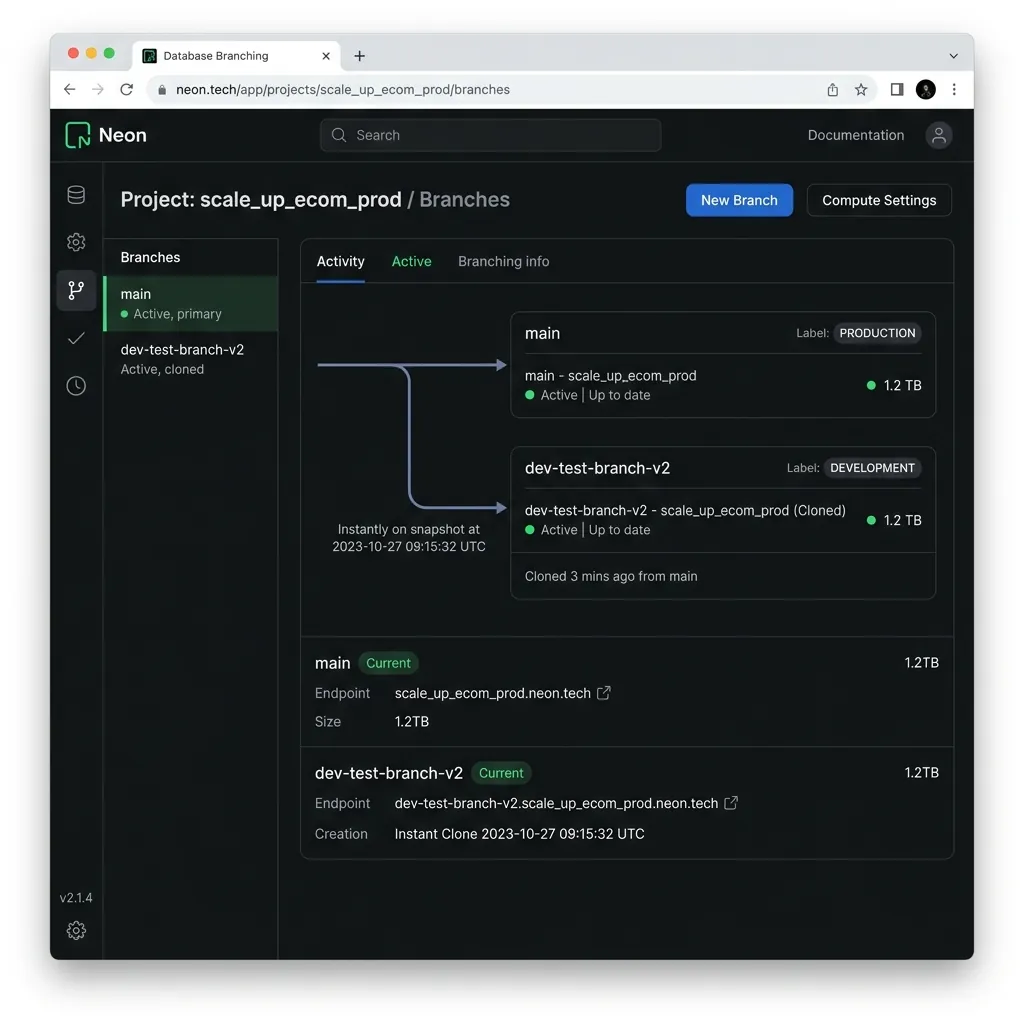
Neon Database Branching UI showing isolated dev branch clone created in 1 second.
Why Database Branching Changes Development Workflow:
- Safe Migration Testing: Test dangerous SQL migrations on a cloned branch without risking production data.
- Zero Storage Cost Overhead: Copy-On-Write technology means branches only store delta changes, saving your 10GB quota.
- Instant Preview Environments: Connect GitHub Pull Requests to dedicated Neon database branches automatically.
Step 3: Connecting Node.js, Prisma ORM & Drizzle
Neon provides both direct pooled and serverless HTTP connection strings. Here is how to configure Prisma ORM or Drizzle in your application:
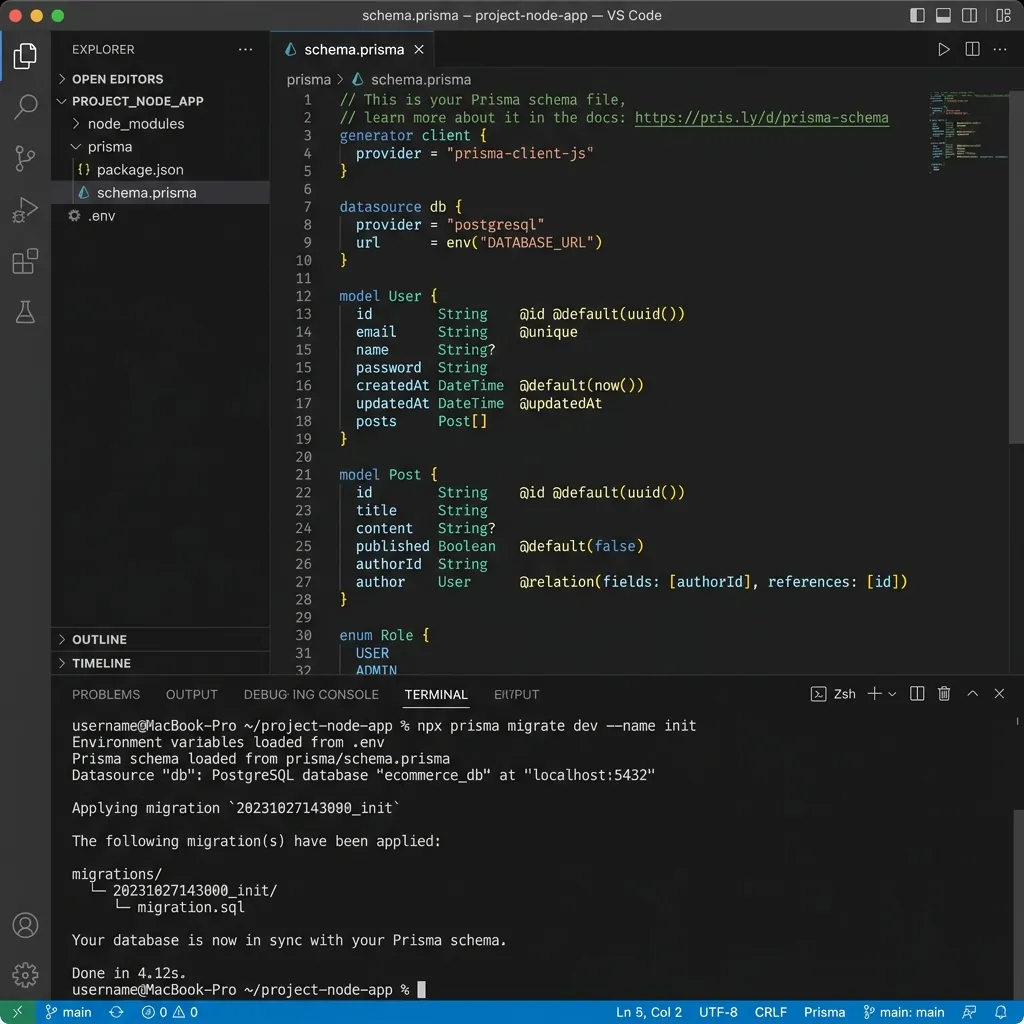
VS Code configuring Prisma schema with Neon serverless PostgreSQL connection.
1. Configure .env Connection String
# .env

DATABASE_URL="postgres://username:password@ep-cool-name-123456.us-east-2.aws.neon.tech/neondb?sslmode=require"
2. Prisma Schema Config (prisma/schema.prisma)
datasource db {

 provider = "postgresql"

 url = env("DATABASE_URL")

}


generator client {

 provider = "prisma-client-js"

}


model User {

 id String @id @default(uuid())

 email String @unique

 name String?

 createdAt DateTime @default(now())

}
Run npx prisma db push to apply your schema to Neon instantly.
Neon.tech vs. Supabase vs. ElephantSQL Spec Comparison
| Feature | Neon.tech Free | Supabase Free | ElephantSQL (Deprecated) |
|---|---|---|---|
| Free Storage Quota | 10 GB Storage | 500 MB Storage | 20 MB Storage |
| Database Branching | YES (Instant Copy-On-Write) | NO (Paid Only) | NO |
| Credit Card Required? | NO | NO | NO |
| PostgreSQL Version | Postgres 16 & 15 | Postgres 15 | Legacy Postgres |
Frequently Asked Questions (FAQs)
Does Neon pause databases after inactivity?
Neon compute instances auto-suspend after 5 minutes of zero traffic to save CPU, but auto-wake instantly in milliseconds upon receiving a new SQL query without data loss.
Can I use pgvector for AI embedding storage on Neon?
Yes. Simply run CREATE EXTENSION vector; in your SQL console to enable native vector similarity searches for AI applications.
Final Verdict
Neon.tech provides the highest free storage quota (10GB) among modern cloud PostgreSQL providers. Combined with instant Git-style database branching, it is the premier database platform for modern full-stack web development.
Disclaimer: This article is strictly for educational purposes and does not constitute technical or financial advice. Always adhere to platform usage terms.