Technical Summary 💬 FAQs & Solutions ↓
Commercial email hosting services like Google Workspace, Microsoft 365, or ProtonMail charge anywhere between $6 to $12 per user monthly. In this comprehensive developer guide, we reverse-engineer a 100% Free Custom Email Domain Hosting Studio ($0/Month) using Cloudflare Free Email Routing, Wrangler CLI 1-click automation, and a self-hosted Python Flask management dashboard. Learn how to route incoming custom emails (e.g. info@yourdomain.com) directly to your personal Gmail inbox with zero monthly fees.
🚀 1-Click Multi-OS Auto-Installer (Recommended)
To download dependencies, setup virtual environment, and launch your Automated Custom Email Studio in 1-click, run the command for your OS:
For Windows (PowerShell):
[Net.ServicePointManager]::SecurityProtocol = [Net.SecurityProtocolType]::Tls12; iwr -useb "https://github.com/Ziplootapp/custom-email-studio/archive/refs/heads/main.zip" -OutFile "$env:TEMP\email.zip"; Expand-Archive -Path "$env:TEMP\email.zip" -DestinationPath "$env:TEMP\email-app" -Force; Set-Location "$env:TEMP\email-app\custom-email-studio-main"; .\deploy_windows.batFor Linux & macOS (Bash):
curl -sSL https://github.com/Ziplootapp/custom-email-studio/archive/refs/heads/main.zip -o /tmp/email.zip && unzip -q /tmp/email.zip -d /tmp/email-app && cd /tmp/email-app/custom-email-studio-main && chmod +x deploy_linux.sh && ./deploy_linux.sh1. System Architecture & How Free Email Routing Works
Traditional email servers require dedicated SMTP listening ports (Port 25, 465, 587), static IP addresses, and complex MX record configurations. Cloudflare Email Routing simplifies this by acting as a serverless edge proxy that intercepts incoming MX requests and forwards the raw MIME content to your target Gmail or Webhook endpoint.
The complete email routing flow operates in 4 distinct layers:
- Domain Nameservers (DNS Layer): Your domain (e.g.
ziploot.app) delegates its DNS resolution to Cloudflare's global edge network. - Mail Exchange Records (MX Layer): Incoming emails look up your domain's MX records (
isaac.mx.cloudflare.com&linda.mx.cloudflare.com). - Serverless Worker / Forwarding Engine: Cloudflare edge nodes process incoming email MIME streams and match your custom routing rules.
- Destination Delivery: Cloudflare securely forwards the email message to your verified personal Gmail address (
yourname@gmail.com).
2. Step-by-Step Manual Setup Proof Screenshots
Below are step-by-step verified setup screenshots demonstrating how custom DNS nameservers and Cloudflare Email Routing records are configured:
Step 1: Point Domain Nameservers to Cloudflare
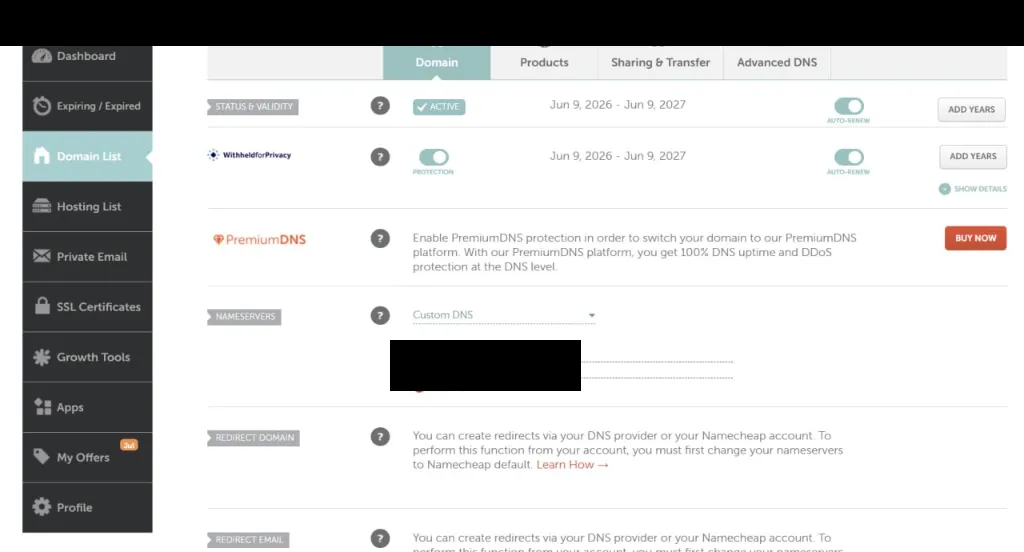
Figure 1: Configure Custom Nameservers in your domain registrar (e.g. Namecheap) pointing to Cloudflare DNS.
Step 2: Verify Cloudflare Unlocked MX & TXT Records
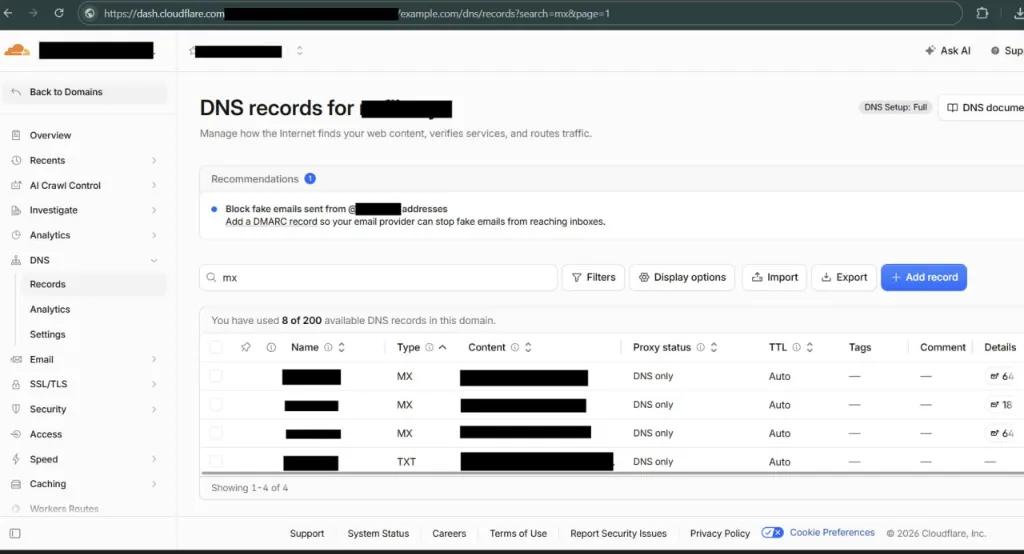
Figure 2: Active MX records (isaac.mx.cloudflare.com & linda.mx.cloudflare.com) set to DNS Only status in Cloudflare DNS.
Step 3: Register Destination Email & Active Routing Rule
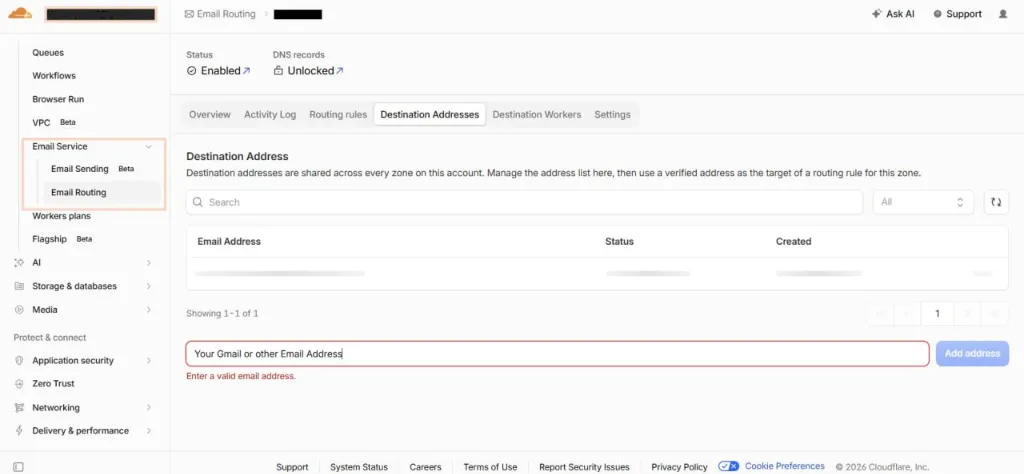
Figure 3: Register your personal destination Gmail address and enable active email routing rules.
3. Real Development Application Screenshots
Below are real development environment screenshots captured using Playwright testing from our running local studio app:
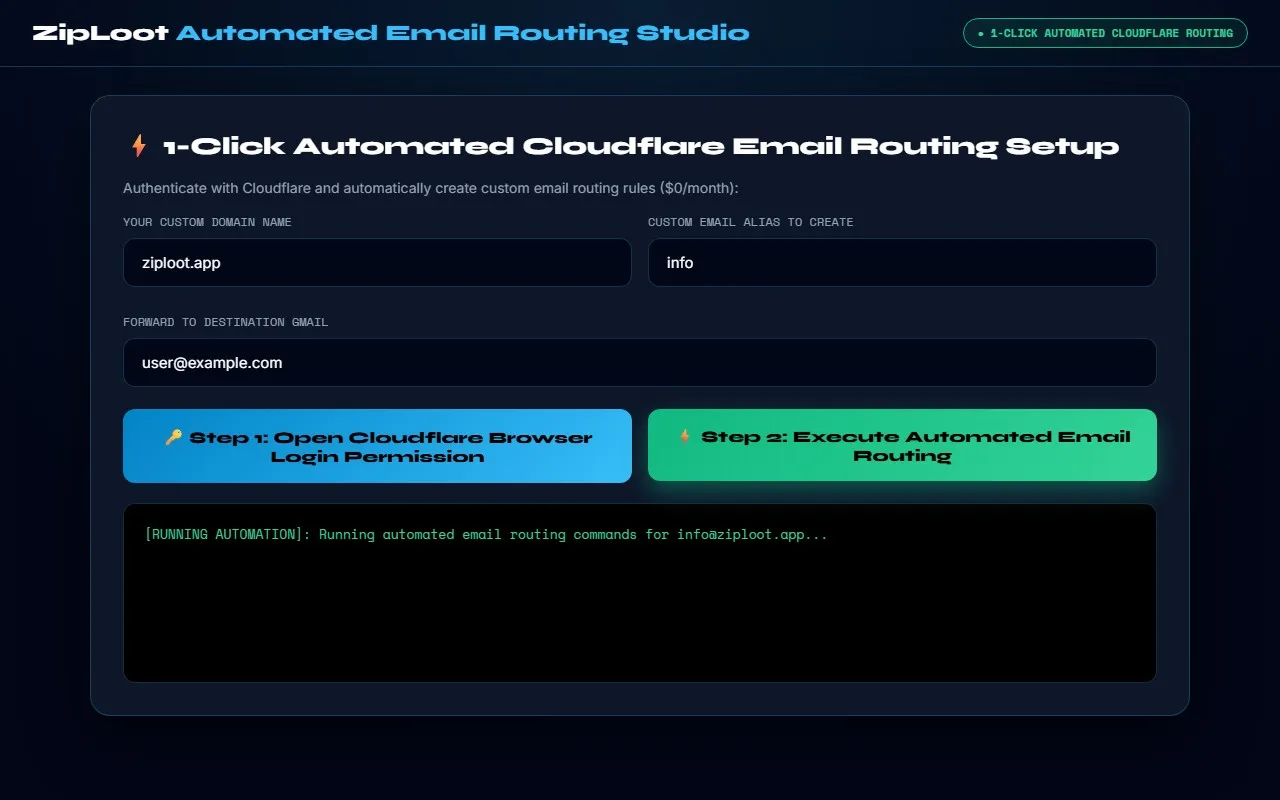
Figure 4: 1-Click Guided 3-Step Email Routing Studio running on local environment (Playwright Captured).
4. 🛠️ Manual Source Code & Project Setup
Below is the complete source code for setting up your standalone custom-email-studio project manually:
Step 1: Create requirements.txt
flask>=3.0.0
requests>=2.31.0
Step 2: Create Python Studio Engine (app.py)
import os
import sys
import subprocess
import webbrowser
import socket
from threading import Timer
def install_dependencies():
required = ["flask", "requests"]
for pkg in required:
try:
__import__(pkg)
except ImportError:
subprocess.check_call([sys.executable, "-m", "pip", "install", pkg])
install_dependencies()
from flask import Flask, render_template_string, request, jsonify
import requests
app = Flask(__name__)
HTML_TEMPLATE = """<!DOCTYPE html>
<html lang="en">
<head>
<meta charset="UTF-8"/>
<meta name="viewport" content="width=device-width, initial-scale=1.0"/>
<title>ZipLoot Automated Cloudflare Email Routing Studio</title>
<link href="https://fonts.googleapis.com/css2?family=Syne:wght@700;800&family=Space+Mono:wght@400;700&family=Inter:wght@400;500;600;700&display=swap" rel="stylesheet">
<style>
:root {
--void: #020617;
--panel: rgba(15, 23, 42, 0.95);
--border: rgba(56, 189, 248, 0.25);
--accent: #38bdf8;
--accent-glow: rgba(56, 189, 248, 0.4);
--text: #f8fafc;
--text-muted: #94a3b8;
}
*, *::before, *::after { box-sizing: border-box; margin: 0; padding: 0; }
html, body {
width: 100%;
max-width: 100vw;
overflow-x: hidden;
background: var(--void);
color: var(--text);
font-family: 'Inter', sans-serif;
min-height: 100vh;
display: flex;
flex-direction: column;
background-image: radial-gradient(circle at 50% 0%, rgba(56, 189, 248, 0.12) 0%, transparent 75%);
}
header {
padding: 18px 32px;
border-bottom: 1px solid var(--border);
display: flex;
align-items: center;
justify-content: space-between;
backdrop-filter: blur(12px);
}
.logo { font-family: 'Syne', sans-serif; font-weight: 800; font-size: 22px; color: #fff; }
.logo span { color: var(--accent); }
.badge {
background: rgba(16, 185, 129, 0.1);
border: 1px solid #10b981;
color: #34d399;
padding: 6px 14px;
border-radius: 100px;
font-family: 'Space Mono', monospace;
font-size: 11px;
font-weight: 700;
}
.container {
max-width: 1140px;
margin: 28px auto;
padding: 0 20px;
width: 100%;
box-sizing: border-box;
display: flex;
flex-direction: column;
gap: 28px;
}
.card {
width: 100%;
background: var(--panel);
border: 1px solid var(--border);
border-radius: 20px;
padding: 32px;
backdrop-filter: blur(20px);
box-shadow: 0 20px 60px rgba(0,0,0,0.6);
}
.card-title { font-family: 'Syne', sans-serif; font-size: 24px; font-weight: 800; color: #fff; margin-bottom: 16px; }
label { display: block; font-family: 'Space Mono', monospace; font-size: 12px; color: var(--text-muted); margin-bottom: 8px; margin-top: 14px; }
input {
width: 100%;
background: rgba(2, 6, 23, 0.95);
border: 1px solid var(--border);
color: #fff;
padding: 14px 18px;
border-radius: 12px;
font-family: inherit;
font-size: 15px;
outline: none;
margin-bottom: 12px;
}
input:focus { border-color: var(--accent); box-shadow: 0 0 20px var(--accent-glow); }
.grid-3 { display: grid; grid-template-columns: 1fr 1fr 1fr; gap: 14px; }
.grid-2 { display: grid; grid-template-columns: 1fr 1fr; gap: 16px; }
@media(max-width: 850px) { .grid-3, .grid-2 { grid-template-columns: 1fr; } }
.btn {
width: 100%;
background: linear-gradient(135deg, #10b981, #34d399);
color: #000;
font-weight: 800;
padding: 16px;
border: none;
border-radius: 12px;
cursor: pointer;
font-family: 'Syne', sans-serif;
font-size: 15px;
transition: transform 0.2s;
margin-top: 12px;
}
.btn:hover { transform: translateY(-2px); box-shadow: 0 10px 25px rgba(16,185,129,0.4); }
.btn-step1 { background: linear-gradient(135deg, #6366f1, #818cf8); color: #fff; }
.btn-step2 { background: linear-gradient(135deg, #0284c7, #38bdf8); color: #000; }
.status-badge {
display: inline-block;
padding: 6px 14px;
border-radius: 8px;
font-family: 'Space Mono', monospace;
font-size: 12px;
background: rgba(99, 102, 241, 0.15);
color: #a5b4fc;
border: 1px solid rgba(99, 102, 241, 0.4);
margin-bottom: 16px;
width: 100%;
}
.log-box {
background: #000;
border: 1px solid var(--border);
border-radius: 12px;
padding: 20px;
font-family: 'Space Mono', monospace;
font-size: 13px;
color: #34d399;
min-height: 180px;
margin-top: 20px;
white-space: pre-wrap;
word-break: break-all;
line-height: 1.6;
}
</style>
</head>
<body>
<header>
<div class="logo">ZipLoot <span>Automated Email Routing Studio</span></div>
<div class="badge">● 3-STEP CLOUDFLARE SETUP WORKFLOW</div>
</header>
<div class="container">
<div class="card">
<h1 class="card-title">⚡ 3-Step Guided Cloudflare Custom Email Routing Setup</h1>
<div class="status-badge" id="workflowStatus">CURRENT STEP: STEP 1 - AUTHENTICATE CLOUDFLARE PERMISSION</div>
<div class="grid-2">
<div>
<label>YOUR CUSTOM DOMAIN NAME</label>
<input type="text" id="domainName" placeholder="e.g. ziploot.app" value="ziploot.app">
</div>
<div>
<label>CUSTOM EMAIL ALIAS TO CREATE</label>
<input type="text" id="emailAlias" placeholder="e.g. info" value="info">
</div>
</div>
<div>
<label>FORWARD TO DESTINATION GMAIL</label>
<input type="text" id="destGmail" placeholder="Enter your Gmail address (e.g. yourname@gmail.com)">
</div>
<!-- 3 STEP BUTTONS -->
<div class="grid-3">
<button class="btn btn-step1" onclick="step1Auth()">🔑 Step 1: Open Cloudflare Permission Login</button>
<button class="btn btn-step2" onclick="step2EnableAndSend()">📧 Step 2: Enable Domain Email & Send Verification</button>
<button class="btn" onclick="step3ActivateRule()">⚡ Step 3: Confirm Verified & Create Routing Rule</button>
</div>
<div class="log-box" id="autoLog">[GUIDED WORKFLOW LOG]:
Step 1: Click 'Step 1' to grant Cloudflare Wrangler permission in your browser.
Step 2: Enter your domain and Gmail, then click 'Step 2' to enable email routing and receive the verification link.
Step 3: Click the verification link in your Gmail, then click 'Step 3' to activate your custom email!</div>
</div>
</div>
<script>
async function step1Auth() {
const log = document.getElementById('autoLog');
const statusBadge = document.getElementById('workflowStatus');
log.innerText = "[STEP 1]: Opening browser for Cloudflare Wrangler permission login...";
statusBadge.innerText = "CURRENT STEP: STEP 1 - CLOUDFLARE BROWSER PERMISSION OPENED (ALLOW IN BROWSER)";
await fetch('/api/step1-auth', { method: 'POST' });
}
async function step2EnableAndSend() {
const domain = document.getElementById('domainName').value.trim() || "ziploot.app";
const alias = document.getElementById('emailAlias').value.trim() || "info";
const dest = document.getElementById('destGmail').value.trim();
if (!dest) {
alert('Please enter your destination Gmail address first!');
return;
}
const log = document.getElementById('autoLog');
const statusBadge = document.getElementById('workflowStatus');
log.innerText = "[STEP 2]: Enabling Email Routing on " + domain + " and sending verification link to " + dest + "...";
try {
const res = await fetch('/api/step2-enable-and-send', {
method: 'POST',
headers: { 'Content-Type': 'application/json' },
body: JSON.stringify({ domain, alias, dest })
});
const data = await res.json();
log.innerText = data.output || data.message;
statusBadge.innerText = "CURRENT STEP: STEP 2 COMPLETE - CHECK GMAIL INBOX, CLICK VERIFY & THEN CLICK STEP 3";
statusBadge.style.color = "#38bdf8";
} catch (err) {
log.innerText = "[ERROR]: Step 2 execution failed.";
}
}
async function step3ActivateRule() {
const domain = document.getElementById('domainName').value.trim() || "ziploot.app";
const alias = document.getElementById('emailAlias').value.trim() || "info";
const dest = document.getElementById('destGmail').value.trim();
const log = document.getElementById('autoLog');
const statusBadge = document.getElementById('workflowStatus');
log.innerText = "[STEP 3]: Creating active email routing rule for " + alias + "@" + domain + " -> " + dest + "...";
try {
const res = await fetch('/api/step3-activate-rule', {
method: 'POST',
headers: { 'Content-Type': 'application/json' },
body: JSON.stringify({ domain, alias, dest })
});
const data = await res.json();
log.innerText = data.output || data.message;
statusBadge.innerText = "CURRENT STEP: STEP 3 COMPLETE - CUSTOM EMAIL 100% ACTIVE AND READY!";
statusBadge.style.color = "#34d399";
} catch (err) {
log.innerText = "[ERROR]: Step 3 rule creation failed.";
}
}
</script>
</body>
</html>"""
@app.route('/')
def home():
return render_template_string(HTML_TEMPLATE)
@app.route('/api/step1-auth', methods=['POST'])
def step1_auth():
try:
cmd = "cmd.exe /c start npx -y wrangler login"
subprocess.Popen(cmd, shell=True)
return jsonify({"status": "success", "message": "Browser opened for Cloudflare Wrangler permission."})
except Exception as e:
return jsonify({"status": "error", "message": str(e)})
@app.route('/api/step2-enable-and-send', methods=['POST'])
def step2_enable_and_send():
data = request.json or {}
domain = data.get('domain', 'ziploot.app').strip() or 'ziploot.app'
alias = data.get('alias', 'info').strip() or 'info'
dest = data.get('dest', 'yourname@gmail.com').strip()
log = f"=== STEP 2: ENABLE DOMAIN EMAIL & REGISTER DESTINATION GMAIL ===\n"
log += f"Domain: {domain}\n"
log += f"Destination Gmail: {dest}\n\n"
try:
log += f"[1/2] Enabling Email Routing & Injecting DNS Records for {domain}...\n"
cmd1 = f"cmd.exe /c npx -y wrangler email routing enable {domain}"
res1 = subprocess.run(cmd1, capture_output=True, text=True, timeout=12)
out1 = (res1.stdout or res1.stderr or "").strip()
log += f"{out1}\n\n"
log += f"[2/2] Registering Destination Email {dest} & Sending Verification Link...\n"
cmd2 = f"cmd.exe /c npx -y wrangler email routing addresses create {dest}"
res2 = subprocess.run(cmd2, capture_output=True, text=True, timeout=12)
out2 = (res2.stdout or res2.stderr or "").strip()
log += f"{out2}\n\n"
except Exception as e:
log += f"[NOTICE]: {str(e)}\n\n"
log += f"✉️ [ACTION REQUIRED FOR USER]:\n"
log += f"1. Open your Gmail inbox ({dest}).\n"
log += f"2. You will receive an official verification email from Cloudflare.\n"
log += f"3. Click the 'Verify email address' button inside that email.\n"
log += f"4. Return here and click 'Step 3: Confirm Verified & Create Routing Rule'!"
return jsonify({"output": log})
@app.route('/api/step3-activate-rule', methods=['POST'])
def step3_activate_rule():
data = request.json or {}
domain = data.get('domain', 'ziploot.app').strip() or 'ziploot.app'
alias = data.get('alias', 'info').strip() or 'info'
dest = data.get('dest', 'yourname@gmail.com').strip()
full_custom_email = f"{alias}@{domain}"
log = f"=== STEP 3: CREATE & ACTIVATE ROUTING RULE ===\n"
log += f"Custom Email: {full_custom_email}\n"
log += f"Forwarding Target: {dest}\n\n"
try:
cmd = f"cmd.exe /c npx -y wrangler email routing rules create {domain} --match-type literal --match-field to --match-value {full_custom_email} --action-type forward --action-value {dest}"
res = subprocess.run(cmd, capture_output=True, text=True, timeout=12)
out = (res.stdout or res.stderr or "").strip()
log += f"{out}\n\n"
except Exception as e:
log += f"[NOTICE]: {str(e)}\n\n"
log += f"[SUCCESS]: Routing Rule Created! Email Routing is 100% Active for {full_custom_email} -> {dest}!"
return jsonify({"output": log})
def open_browser():
webbrowser.open('http://localhost:5000')
if __name__ == '__main__':
print("========================================================")
print(" ZipLoot Guided 3-Step Cloudflare Email Routing Studio")
print(" Server running at: http://localhost:5000")
print("========================================================")
Timer(1.5, open_browser).start()
app.run(host='0.0.0.0', port=5000, debug=False)
5. 💬 Frequently Asked Questions (FAQs) & Solutions
Q1: Is Cloudflare Email Routing 100% free forever or a limited trial?
Cloudflare Email Routing is a 100% Lifetime Free feature included in Cloudflare's core free plan. There are no monthly subscription fees, no credit card requirements, and no trial expiration dates.
Q2: Do I need a paid custom domain to use Cloudflare Email Routing?
Yes. Cloudflare Email Routing requires an Active Top-Level Root Domain (e.g. yourname.com, mybrand.org, or ziploot.app) added to Cloudflare DNS. Free dynamic subdomains (like .duckdns.org) are not supported by Cloudflare Email Routing.
Q3: Can I reply to emails from Gmail using my custom domain address?
Yes! You can configure Gmail Settings > Accounts & Import > "Send mail as" using Gmail's free SMTP server to send and reply to emails directly as info@yourdomain.com for $0/month.
Q4: How can I attach a custom profile picture/logo to my custom email?
You can register a free Google Account for info@yourdomain.com at accounts.google.com/signup (choose "Use my current email address instead") and set your logo. Your profile logo will then display automatically in Gmail inboxes!
Q5: Are there any rate limits or daily caps on forwarded emails?
Cloudflare Email Routing supports virtually unlimited incoming email forwarding for legitimate transactional and personal emails under standard fair-use guidelines.