Technical Summary
Running a large language model normally requires a powerful GPU server, OpenAI API credits, or expensive cloud infrastructure. By leveraging WebGPU — the browser's native GPU access API — and the MLC WebLLM runtime, you can execute the full DeepSeek R1 Distill (1.5B) model entirely inside your browser tab. No server. No API key. No monthly cost. Your data never leaves your device. 💬 FAQs & Solutions ↓
🚀 Live Demo — Try It Now (Free, No Login)
We built a full working sandbox. Open it in Chrome or Edge and start chatting with DeepSeek R1 directly — the model downloads once (~900MB) and runs 100% locally after that.
Requires Chrome 113+ or Edge 113+ with WebGPU enabled. GPU with 4GB+ VRAM recommended.
What This Demo Does
- Runs DeepSeek-R1-Distill-Qwen-1.5B — a reasoning-optimized LLM fully quantized for browser inference
- Zero cost — no OpenAI API, no Hugging Face Pro, no server bills
- 100% private — all inference happens on your GPU, nothing is sent to any server
- Offline after first load — model is cached in IndexedDB, works without internet after initial download
- Streaming responses — real-time token-by-token output with visible reasoning chain (
<think>blocks) - WebGPU powered — uses your browser's native GPU API, achieving ~80% of native inference speed
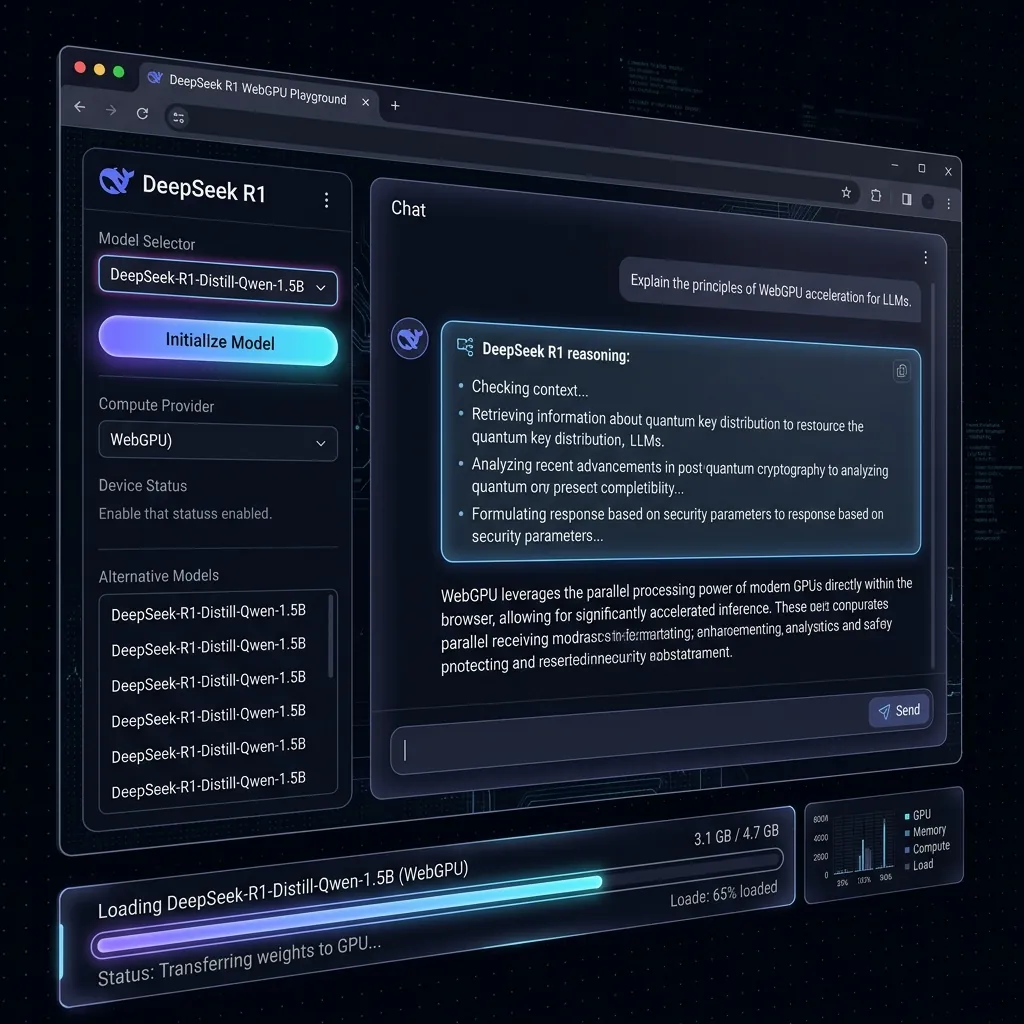
DeepSeek R1 Distill running live in a browser tab using WebGPU — no server required.
How It Works — Technical Architecture
The entire pipeline has three layers:
1. WebGPU — Browser Native GPU Access
WebGPU (available in Chrome 113+ and Edge 113+) gives JavaScript direct access to the system GPU via a low-level graphics API. Unlike WebGL which is designed for rendering, WebGPU supports compute shaders — the same primitives used for neural network matrix multiplication. This makes it possible to run transformer models at near-native speeds.
2. MLC WebLLM — The Inference Engine
MLC WebLLM is an open-source project from the MLC AI team that compiles LLMs to run on WebGPU using TVM (Tensor Virtual Machine). It handles:
- Downloading and caching model weights from Hugging Face CDN
- Running quantized (4-bit) inference via WebGPU compute shaders
- Providing an OpenAI-compatible streaming API in the browser
3. DeepSeek R1 Distill — The Model
The DeepSeek-R1-Distill-Qwen-1.5B-q4f16_1-MLC variant is a knowledge-distilled version of the full DeepSeek R1 model. It uses chain-of-thought reasoning (visible via <think> tokens) and fits in ~900MB of GPU memory after 4-bit quantization — small enough for most modern gaming or work laptops.
Step-by-Step: Using the Demo
Step 1 — Check Browser Compatibility
Open Chrome 113+ or Edge 113+. Firefox and Safari do not fully support WebGPU compute shaders yet. Verify WebGPU is working at webgpureport.org.
Step 2 — Open the Sandbox
Visit the live demo:
https://ziploot.github.io/free-deepseek-r1-browser/Step 3 — Initialize the Model
Click "Initialize Model" in the left sidebar. The model (~900MB) downloads once from the MLC CDN and is cached in your browser's IndexedDB. On subsequent visits, it loads from cache in seconds.
You'll see a progress bar and percentage. On a 50Mbps connection this takes about 2–3 minutes on first run.
Step 4 — Start Chatting
Once the model loads (status shows "✓ Model Loaded"), type any question and press Enter. DeepSeek R1 will show its reasoning chain first (in a separate block), then deliver the final answer — all running on your local GPU.
Self-Host It: Clone & Deploy Your Own
The full source code is open on GitHub. Clone it and deploy to your own GitHub Pages in 60 seconds:
# Clone the repo

git clone https://github.com/Ziploot/free-deepseek-r1-browser.git

cd free-deepseek-r1-browser


# Enable GitHub Pages:

# Go to Settings → Pages → Source: Deploy from branch (main, /root)

# Your sandbox will be live at: https://yourusername.github.io/free-deepseek-r1-browser/
Supported Models
The sandbox supports any model in the MLC WebLLM prebuilt model list. The dropdown auto-populates with available models. Some options:
- DeepSeek-R1-Distill-Qwen-1.5B-q4f16_1-MLC — ~900MB, best reasoning, recommended
- Llama-3.2-1B-Instruct-q4f16_1-MLC — ~600MB, faster, general chat
- Phi-3.5-mini-instruct-q4f16_1-MLC — ~2GB, higher quality, needs 6GB+ VRAM
- Qwen2.5-0.5B-Instruct-q4f16_1-MLC — ~400MB, ultra-small, fastest
System Requirements
- Browser: Chrome 113+ or Edge 113+ (WebGPU required)
- GPU: Any modern GPU with 4GB+ VRAM (integrated Intel Iris Xe also works for small models)
- RAM: 8GB system RAM minimum
- Storage: ~1GB free disk space (model cached in browser)
- Internet: Required only for initial model download; runs offline after
Try DeepSeek R1 In Your Browser — Right Now
Free forever. No signup. No API key. Your data stays on your device.
⚡ Open Free Demo →⭐ Star on GitHub